
Skin Retouch with AI: Remove Blemishes Naturally
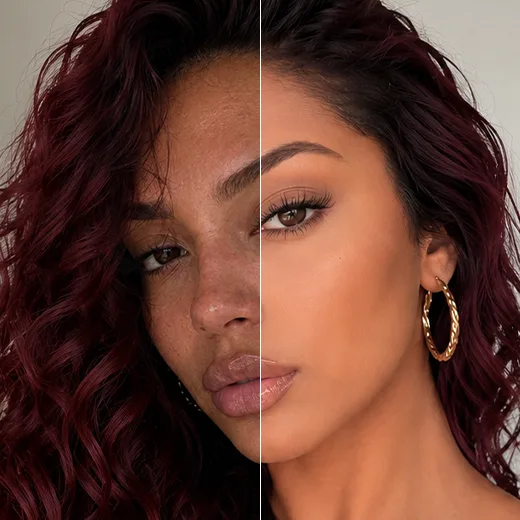
Facelab's AI Skin Retouch removes dark spots, evens tones, and refines your skin. As a leading skin retouch with AI tool, it tells temporary blemishes from permanent features, so you get a natural result in a few taps, no Photoshop needed. It preserves your facial details and true skin tone.
Drop your photo here
JPG, PNG, WEBP
Explore more Facelab tools
AI Make Up Editor
Apply virtual lipstick, eyeshadow, and blush instantly.
Open Tool →AI Hairstyle
Try any hairstyle and color — from subtle to bold.
Open Tool →Object Remover
Erase unwanted objects from photos with AI precision.
Open Tool →Background Remover
Remove any background in seconds with AI precision.
Open Tool →Watermark Remover
Erase watermarks and logos from any image instantly.
Open Tool →AI Teeth Whitening
Brighten your smile with realistic whitening in one tap.
Open Tool →Eye Color AI Editor
Change eye color naturally — any shade, any photo.
Open Tool →Image Upscaler
Enlarge photos up to 4× without losing quality.
Open Tool →Body Editor
Slim, reshape, or adjust body proportions with AI tools.
Open Tool →Skin Retouch
Smooth skin, reduce blemishes, perfect your complexion.
Open Tool →Face Shape Editor
Subtly reshape facial features with natural precision.
Open Tool →Resizing Image
Resize photos to any size without quality loss.
Open Tool →Instagram AI Photo Editor
Edit photos for Instagram with one tap AI presets.
Open Tool →Sky Replacement
Swap a dull sky for a sunset, clouds or stars.
Open Tool →Background Blur
Blur the background like a portrait lens, or add bokeh.
Open Tool →Light Effects
Add light leaks, flares and a warm glow.
Open Tool →Photo Textures
Lay film grain, dust or paper over any photo.
Open Tool →Photo Color Correction
Fix exposure, color and tone with 17 dials.
Open Tool →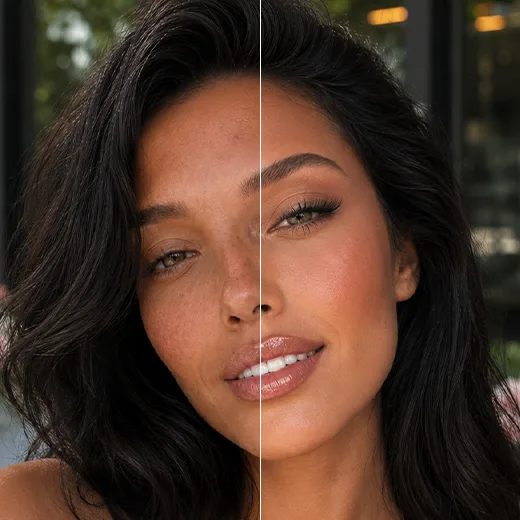
App to Lighten Dark Spots on Skin & Fix All Tones
The tool works across every skin type and tone. Many struggle to find an app to lighten dark spots on skin that treats hyperpigmentation without washing out their color, but Facelab clears dark spots, scars, and redness for even, glowing skin, with no plastic look and no unwanted lightening on melanin-rich skin.
Match Color Palettes and Enhance Skin Tone with AI
Your undertone shapes how you edit and what makeup suits you. Our enhance skin tone AI reads the subtle color values in your complexion, identifies whether you are warm, cool, or neutral, and builds a custom palette so you can fine-tune lighting and preview shades instantly.
Retouch Photos for Free with AI
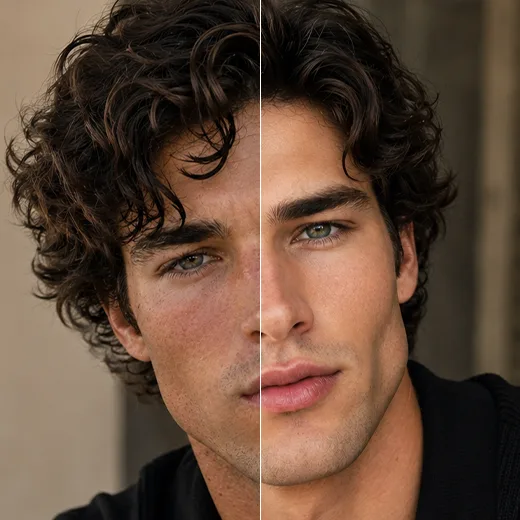
You should not need a design degree to look your best. Facelab gives you professional retouching without the training. In the app you can smooth skin, clear blotches, lift shadows, and fix harsh lighting, with fast, realistic results, free to try.
Stand out with Facelab.
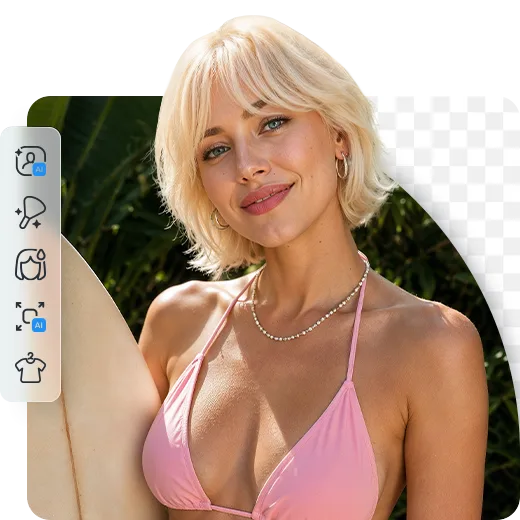
Facelab is the quick and easy photo editing app to make impactful social posts, product images, and creative visuals. Create one-of-a-kind content fast — regardless of skill level — with powerful AI tools, an intuitive editor, and professional results ready to share in seconds.
What our users say
“I used to spend 20 minutes editing photos by hand. Now it takes 5 seconds. The results look more polished too.”
“Perfect for my e-commerce store. My listings look so much more professional now — and it's instant.”
“I tried every free tool out there. Facelab handles edge cases — hair, fine details — better than anything else.”
“I shoot products on my kitchen table. Facelab makes them look like a proper studio shot every time.”
“Used to outsource at $5 a photo. Now it's instant and free. The quality is identical — clients can't tell.”
“I edit photos for marketing assets in minutes. It completely changed how fast I can ship creative.”


Do more with the Facelab app
Get 25+ AI-powered editing tools, filters, and creative effects — free on iOS and Android.


Facelab AI Skin Retouch: Frequently Asked Questions
Learn how to remove blemishes naturally and achieve flawless results with Facelab. Read our FAQ to discover how our AI skin retouching app effortlessly lightens dark spots, analyzes your undertones, and provides professional-grade edits for all skin types without the need for complex software.
How does the AI skin retouching app remove blemishes naturally?
Facelab uses advanced AI to intelligently distinguish between temporary blemishes and your permanent facial features. It gently removes acne marks, dark spots, and rough textures while preserving your natural skin tone and facial details, ensuring the final image looks authentic rather than plastic or over-processed.
Is this a good app to lighten dark spots on skin for all complexions?
Yes, Facelab functions perfectly across all skin types and tones. It is a highly effective app to lighten dark spots on skin and treat hyperpigmentation without washing out your natural color. It is especially recognized as a top dark spot remover for Black or melanin-rich skin, delivering even and glowing results without any lightening or distortion.
How does the skin tone AI help me edit my photos?
Our advanced skin tone AI analyzes the subtle chromatic values of your complexion to identify if your natural undertone is warm, cool, or neutral. It then generates a customized color scheme, enabling you to adjust lighting, make minor skin color adjustments, and even preview makeup shades that perfectly match your palette.
Do I need Photoshop skills to use this free online retouching app?
Not at all. You don't need any graphic design experience to look your best. Facelab is designed to be user-friendly, allowing you to achieve professional skin retouching results—like smoothing skin, removing shadows, and correcting harsh lighting—with simple operations and no steep learning curve.
Can I retouch photos for free to fix uneven tones?
Yes, Facelab allows you to retouch photos for free and easily correct uneven tones, redness, or blotches. Our free online retouching app delivers fast, realistic, and subtle edits for your portraits and selfies, giving you professional capabilities without the high costs or complexity of traditional editing software.
How does the Facelab AI Skin Retouch tool remove dark spots and acne?
Facelab's AI Skin Retouch tool utilizes blemish detection algorithms to pinpoint specific imperfections like acne, dark spots, and scars. Instead of blurring the entire face, the AI 'heals' only the affected pixels by blending them with the surrounding healthy skin data. This removes the distraction while keeping the rest of your face sharp and detailed.
Is the Facelab Skin Retouch tool safe for melanin-rich and dark skin tones?
Absolutely. Facelab's AI is built on an inclusive dataset designed to respect melanin-rich skin. The algorithms focus on texture smoothing and blemish removal without altering the natural skin color or causing 'whitewashing.' The Facelab engine preserves the depth and richness of dark complexions, ensuring the lighting remains accurate and respectful.
How do I smooth my skin without losing texture or looking 'plastic'?
The key is Facelab's texture preservation technology. Unlike basic beauty filters that apply a heavy Gaussian blur, Facelab AI separates the color layer from the texture layer (frequency separation). It smooths out blotchiness and discoloration on the color layer while retaining the micro-contrast of pores and skin grain, ensuring you never look like a plastic doll.
Can Facelab help me identify my skin undertone?
Yes, Facelab features an AI Undertone Analyzer. By scanning your complexion, the tool identifies whether your skin has warm, cool, or neutral undertones. Based on this analysis, Facelab generates customized color palettes and makeup suggestions that harmonize perfectly with your natural coloring.
Does Facelab correct redness and uneven skin tone automatically?
Yes, correcting blotchy skin is a primary function of the Facelab Skin Retouch tool. The AI detects areas of inflammation, redness, or hyperpigmentation and automatically balances them to match your median skin tone. This creates a unified, glowing complexion without the need for manual concealer or heavy foundation.
Try Facelab Now!
Virtual makeup, skin retouching, and AI enhancement — free to try right now.
Free to download · No commitment required